School operations & timetabling

Conflict-free timetables, generated in minutes.

Lumina EduSync brings master data, a constraint-aware solver, teacher workload balancing, manual review, and a publishing workflow into one bilingual platform — with a Teacher Portal, attendance follow-up, requests, room booking, and analytical reports for school operations.

14-day trial · No credit card required · Bilingual EN/AR · RTL ready

Sample data
Math
Arabic
Physics
English
Art
Science
Math
PE
History
Chemistry
English
Music
Arabic
Physics
Art
Chemistry
Science
History
PE
Math
Conflicts0
The night before term

Every room, switched on and ready.

Teachers, rooms and classes line up before the first bell.

Find the clashes

Shine a light on the clashes.

Move your cursor over the timetable. The solver’s answer sits right under the mess.

Hand-built draftSample data
Math
Arabic
Physics
English
Art
Science
Math
PE
History
Chemistry
English
Music
Arabic
Physics
Art
Chemistry
Science
History
PE
Math
Solved timetableSample data
Math
Arabic
Physics
English
Art
Science
Math
PE
History
Chemistry
English
Music
Arabic
Physics
Art
Chemistry
Science
History
PE
Math
Four layers down

From a blank year to a published timetable.

Set up your academic year

Terms, holidays, periods, and working days — a guided wizard gets the calendar right.

Illustration · sample data

Load master data

Import teachers, classes, and rooms from Excel, or enter them manually.

Illustration · sample data

Generate & review

Define constraints; the solver returns a scored, conflict-free schedule you can review and edit.

Illustration · sample data

Publish & export

Publish the timetable and share structured exports and reports across teachers, classes, and rooms.

Illustration · sample data
After the timetable

Six modules for the school day itself.

Beyond timetabling, Lumina EduSync supports day-to-day school operations. These modules are available on higher tiers — included on School Plus, available as add-ons on Professional, and by agreement on Enterprise.

Teacher Portal

Teachers access their own timetable and follow up on their classes from one place.

Student Attendance

Record and follow up on student attendance from the Teacher Portal.

Teacher Requests

Teacher absence and operational requests with a clear review workflow.

Room Booking

Room booking and room-request management across the school.

Grade Analytics Reports

Analytical reports for grades and academic performance.

Advanced Operations

Operational constraints and multi-campus controls for larger schools.

Availability differs by plan — see the comparison on the pricing page.

Product walkthrough

See Lumina EduSync in action

A quick visual walkthrough of how Lumina unifies school operations, teacher workflows, attendance, academic performance, and intervention tracking in one platform.

Open full explainerIf the animation does not appear, open the full explainer in a new tab.
One clear path

Activate your account. Publish your first timetable.

Your workspace walks you through setup one step at a time. The next step is always highlighted, progress updates as you add data, and you can import your school data in one go.
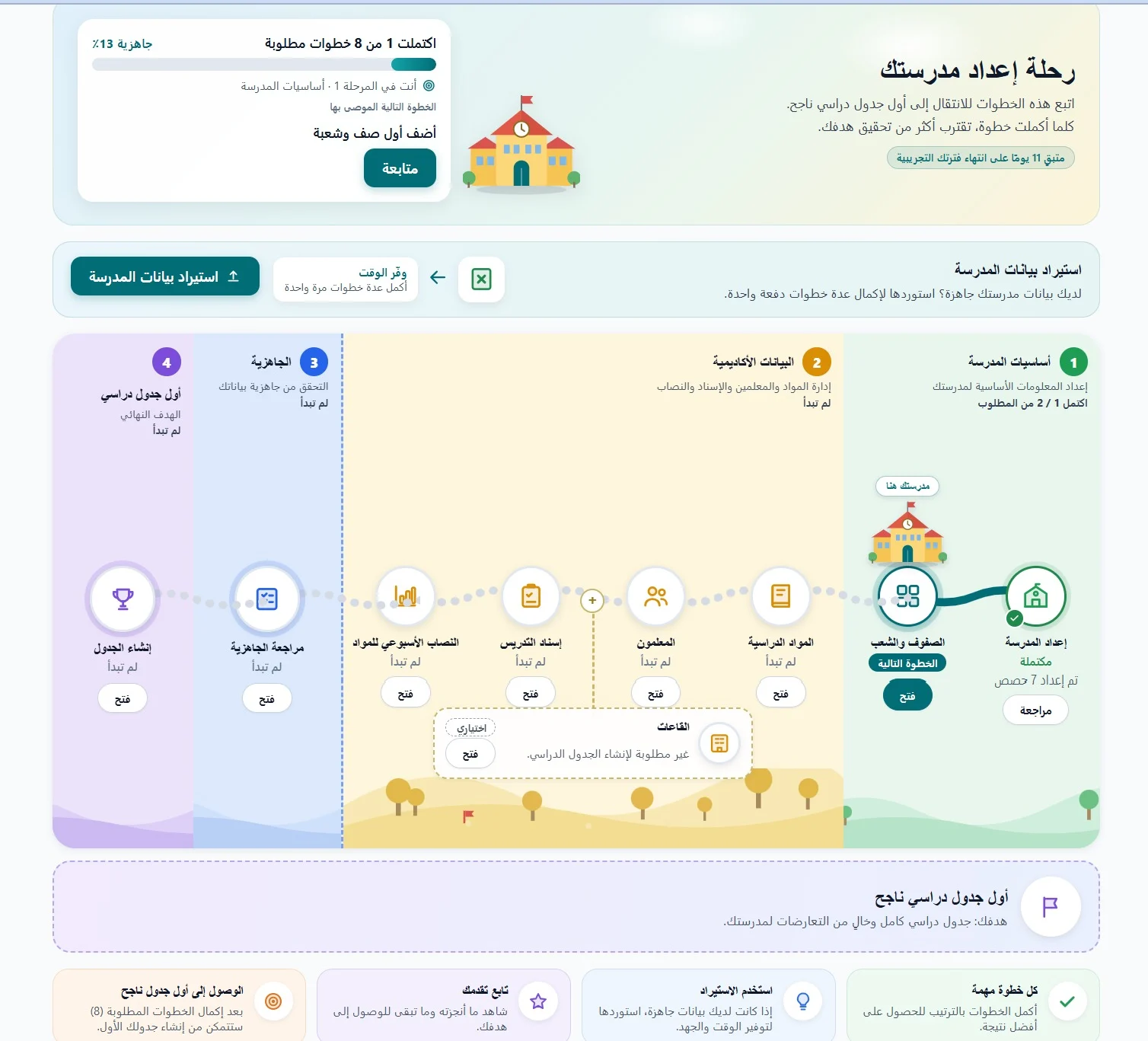
  1. Stage 1: School basics

    • School setup
    • Grades & sections
  2. Stage 2: Academic data

    • Subjects
    • Teachers
    • Teaching assignments
    • Weekly subject load
    • RoomsOptional
  3. Stage 3: Readiness

    • Review readiness
  4. Stage 4: First timetable

    • Generate timetable
The Lumina EduSync guided setup screen: four stages from school basics to the first timetable, with a progress card and a recommended next step.
The guided setup inside your workspace.
  • Import your school data in one go
  • Always one recommended next step
  • Optional steps never block you

8 required steps, in order. Rooms are optional.

First light

Built for the way your school actually runs.

Illustration · sample data
EN / ARBilingual, RTL-ready
14-dayFree trial, no card
ExcelImport & export
RBACRoles + audit trail

Common scheduling challenges we help solve

How Lumina EduSync is designed to help. Outcomes depend on your data and configuration.

  • Reduce manual scheduling effort — generate a draft instead of building it cell by cell.
  • Identify timetable conflicts before publishing, across teachers, rooms, and classes.
  • Support fairer teacher workload distribution with daily and weekly load rules.
  • Improve visibility across teachers, classes, rooms, and schedules in one place.
  • Keep a reviewable record with structured exports, reports, and an audit trail.
  • Work bilingually in English and Arabic, with RTL readiness for your team.
Simple pricing in AED

Pay for the plan your school actually needs

A free trial, three AED-priced plans — Starter, Professional, and School Plus — plus quote-based Enterprise and Enterprise Custom / White Label. Choose the plan that matches your school size, timetable complexity, and operational needs.

Ready to give your team back their afternoons?

Start a free trial in minutes. No credit card. No sales call unless you ask for one.